Problem logging into SmartLife and Tuya

Hi Jiří,

Thank you for testing R5 and for the additional information!

The fact that your temperature sensor is a BLE device connected through a hub is very useful.

I can see from your previous R4 log that the Tuya API successfully returns temperature, humidity, and battery values for your sensor.

However, these values do not seem to reach the corresponding THR attributes.

The missing THR DEVICE SYNCHRONIZATION START section is also interesting. It may simply mean that the log was captured before device synchronization completed.

Could you please check one thing?

After starting THR with R5, does your temperature sensor appear in the THR Devices list with its attributes, including DP_temp_current ?

If it does, please let me know whether the attribute has a value in the device properties, or whether it is empty there as well.

This will help us distinguish between a device synchronization issue and a sensor value mapping issue.

No need to upload another full log at this stage.

Thanks again!

Best regards,
Kalle
Kalle,

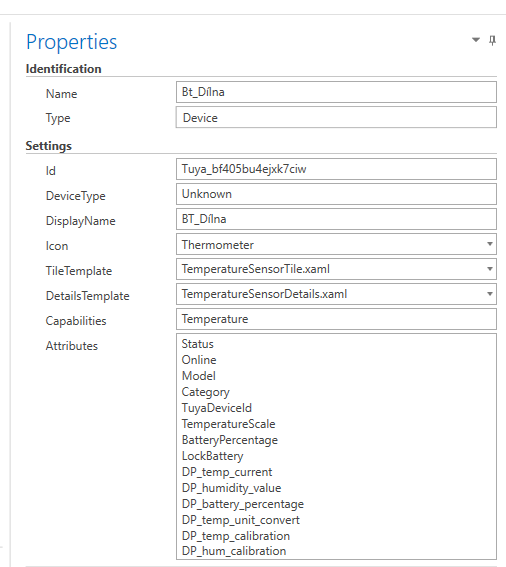
the temperature sensor appears in the list after start with attributes (see att.)
The attribute has no value.

Hi Jiří,

Thank you, that confirms exactly what I needed!

Your BLE sensor is successfully discovered and its attributes are registered in THR, but the values remain empty.

Your previous log also shows that the Tuya status API returns valid temperature, humidity, and battery readings.

I will now investigate the mapping between these status values and the THR attributes, especially for BLE devices connected through a hub.

The next version, R20 R6, will focus on this issue while preserving the working pagination and authentication fixes.

No further testing is needed from you at the moment.

Thanks again for your excellent support!

Best regards,
Kalle

Hi Jiří,

R20 R6 – BLE Sensor Fallback is now available for testing.

This version adds a fallback for sensor values retrieved through the Tuya IoT-03 status API when the corresponding Shadow Properties do not contain usable values.

The existing pagination and authentication fixes remain unchanged.

I’ve tested R6 successfully with my own Tuya device.

Could you please install R6, make sure older plugin versions are disabled, and check your BLE temperature sensor again?

Please test these bindings:

  • {Binding @Device.DP_temp_current}
  • {Binding @Device.DP_humidity_value}
  • {Binding @Device.DP_battery_percentage}

Let me know whether the values now appear.

If they are still empty, please send only the relevant R6 diagnostic lines, particularly those containing THR R6 SENSOR FALLBACK , after checking that no sensitive information is included.

Thank you!

Best regards,
Kalle

Tuya_Cloud_Generic_1_9_R20_R6_BLE_Sensor_Fallback.plugin (134.9 KB)

Hi Kalle,
thanks for the new R6.
Testing was negative. I test several devices because of the special characters i use.
None of them shows the values.
The content of the console.log was the summary of each GENERIC PROBE DEVICE.
The values were there (s.att)

LG, Jiří
R6_console.log.txt (9.3 KB)

Hi Jiří,

Thank you for testing R6 and for sending the diagnostic output.

Your log confirms that the Tuya API successfully returns the sensor measurements:

  • Temperature: 14.3 °C
  • Humidity: 38%
  • Battery: 35%

Both the IoT-03 and legacy status endpoints return these values.

I have reviewed the R6 fallback code and found a possible limitation: it currently expects the corresponding Shadow Properties to exist before it can fill in missing values.

Could you please send the RAW DP DISCOVERY section for BT_Dílna, including the model and shadow property results?

If available, the THR R6 SENSOR FALLBACK and THR DEVICE SYNCHRONIZATION entries for this device would also be helpful.

Please check the excerpt for sensitive information before sharing it.

I believe we are getting closer to identifying the problem.

Best regards,
Kalle

Kalle,
once I understood what the console.log data looks like I was able to discover, that the run of THR is divided in two parts:

  1. read and initialize the devices
  2. polling the process and set the values

The last test was not complete because I do not wait for the polling sequence .
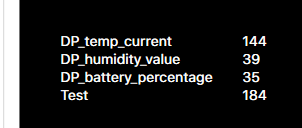
After the polling sequence was done, I have the values visible. But the format is wrong and the time is horrible long.

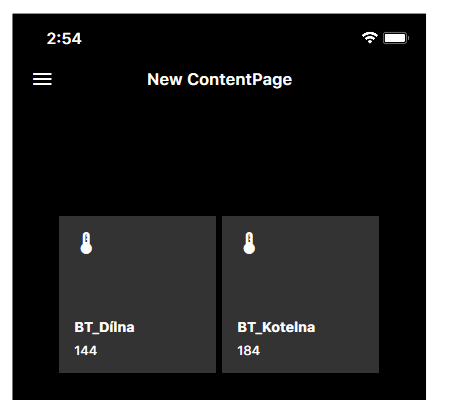
Because of the capability of the device (set to Temperature) there is only the temperature available in the Tile (template) shown ion screen.

LG, Jiří
R6_console.log.txt (1009.1 KB)
Snímek obrazovky 2026-11-06 093305
Snímek obrazovky 2026-11-06 093325

Hi Jiří,

Excellent news! Thank you for the clarification and the screenshots.

This confirms that R6 successfully transfers the sensor values into THR, including devices with special characters in their names.

Your latest log also confirms that all 67 devices are now discovered successfully.

We have two remaining issues to address:

  1. Value scaling: The temperature is displayed as 144 instead of 14.4 °C. We need to apply the scale defined in the Tuya device specification.
  2. Performance: Initialization and polling take far too long with 67 devices. I will investigate how to reduce unnecessary API requests and improve the startup process.

The next development version, R7, will focus on these improvements.

Thank you again for your patience and excellent testing!

Best regards,
Kalle

Hi Jiří,

R20 R7 – Scaled Values & Faster Startup is ready for testing.

This version includes three improvements:

  1. Value scaling: Temperature values should now be displayed correctly (e.g. 144 → 14.4 °C).
  2. Faster startup: Extended diagnostics are now disabled by default. They can be enabled in the plugin settings when needed.
  3. Smaller polling batches: The plugin processes five devices per polling cycle instead of querying all devices at once.

I’ve successfully tested R7 locally with my Trotec device.

Could you please test R7 and check:

  • Are all 67 devices still discovered?
  • Are temperature values displayed correctly?
  • How long does it take until the first sensor values appear?

Please keep Extended Diagnostics set to false for this test.

Thank you again for your help!

Best regards,
Kalle

Tuya_Cloud_Generic_1_9_R20_R7_Scaled_Values_Faster_Startup.plugin (136.5 KB)

Kalle,
just before the midday coffee…

Test ok.
Values visible.
Values correct in value but label °C and % missing

Times:
load plugin: 96sec
sync devices: 132sec
run THR until first sensor value: 45sec

Speedtest of internet:
ping: 12ms
down: 30,98Mb/s
up: 14,42Mb/s

let’s have some :coffee:

LG, Jiří

Hi Jiří,

Excellent news! :coffee:

Thank you for testing R7 and providing the timing measurements.

I’m very happy that the sensor values are now visible and correctly scaled.

The missing °C and % labels should be straightforward to address.

The performance numbers are particularly useful. With 67 devices, the initialization and synchronization times are still much too long.

For the next version, R8, I will focus on reducing unnecessary API requests, improving device initialization, and making the first sensor values available sooner.

I will also look into displaying the correct measurement units without affecting the numeric attributes used by THR bindings.

Thank you again for your patience and excellent testing.

Enjoy your coffee! :coffee:

Best regards,
Kalle

Hi Jiří,

R20 R8 – Performance & Display Units is ready for testing! :coffee:

This version focuses on improving performance, especially for installations with many Tuya devices like yours.

What’s new in R8:

  1. Product Model Cache: Devices sharing the same Tuya product ID can reuse previously retrieved model definitions, reducing unnecessary API requests.
  2. Faster initialization: An unnecessary diagnostic API request has been removed from normal operation.
  3. Display units: New display attributes provide formatted values such as 14.4 °C and 38 % , while the original numeric attributes remain unchanged.

Could you please test the following?

  • Are all 67 devices still discovered?
  • Are the sensor values displayed correctly?
  • Do the new DP_*_Display attributes show the correct units?
  • Has the startup performance improved?

It would be great if you could measure the same three times as before:

  • Plugin loading (previously 96 seconds)
  • Device synchronization (previously 132 seconds)
  • Time until the first sensor value appears (previously 45 seconds)

Please keep Extended Diagnostics disabled for this test.

R8 is an experimental performance update, so I’m particularly interested in whether the product cache makes a noticeable difference with your devices.

Thank you again for your continued support and excellent testing!

Best regards,
Kalle

Tuya_Cloud_Generic_1_9_R20_R8.plugin (138.8 KB)

Hi Kalle,

great work!

Test passes.

Results:
load plugin: 25sec
sync devices: 44sec
run THR until first value: 42sec

all sensors loaded.

LG, Jiří

Hi Jiří,

Wow, these are excellent results! :coffee::tada:

Thank you very much for testing R8.

The performance improvement is impressive:

  • Plugin loading: 96 → 25 seconds
  • Device synchronization: 132 → 44 seconds
  • First sensor value: 45 → 42 seconds

And most importantly, all sensors are still loaded successfully!

This confirms that the optimizations in R8 are making a significant difference.

For the next step, I would like to focus on reducing the remaining delay before the first sensor values appear.

One small question: Are the new display attributes with °C and % also working correctly?

Best regards,
Kalle

Hi Kalle,

sorry not mentioned that: YES, the values are correct with °C and %!

A little comment from my side:
The switch devises are correct identified with Type and Icon. Therefore the templates are correct assigned.
The temperature devices are identified as Sensor and therefore the icon and template are wrong and has to be assigned by hand.

There are two more devices that are not correct identified, but I think we can manage that later (the devices are hubs and RF switches that are managed by the hub)

LG, Jiří

Hi Jiří,

Thank you for the additional feedback!

Excellent news that the display values and units (°C and %) are now working correctly.

Your observation about device identification is very helpful.

For R9, I will focus on two improvements:

  1. Temperature sensor identification: Improve the automatic THR device type assignment so temperature sensors receive the appropriate icon and template, without requiring manual changes.
  2. First sensor value: Investigate the remaining delay of approximately 42 seconds and see whether we can reduce it.

The switch devices are already identified correctly, so I will preserve their existing behavior.

I agree that we can investigate the hubs and RF switches later. It makes sense to concentrate on the temperature sensors first.

Thank you again for your excellent testing and detailed feedback!

Best regards,
Kalle

Hi Jiří,
I have forgotten to post the last Version bfore I startet my vacation. Now I am back and here it is.
R20 R9 – Temperature Sensor Presentation Pilot ready for testing! :coffee:

This version focuses on improving the automatic identification and presentation of temperature sensors in THR.

What’s new in R9:

  • Temperature-only sensors are now assigned the device type TemperatureSensor.
  • The plugin attempts to assign the Thermometer icon and TemperatureSensorTile.xaml template automatically.
  • Switches and devices with temperature setpoints remain unchanged.
  • A new setting, Temperature Sensor Templates, allows this feature to be enabled or disabled.

Could you please check:

  1. Are all 67 devices still discovered correctly?
  2. Do temperature sensors now receive the correct device type, icon and template?
  3. Are the temperature values and units (°C and %) still displayed correctly?
  4. Do the existing switch devices continue to work as before?

Please note that the template name is still experimental. If THR does not recognize it, you can disable the new feature by setting Temperature Sensor Templates to false.

For now, R9 focuses only on device presentation. We will address the remaining polling delay separately.

Best regards,
Kalle

Tuya_Cloud_Generic_R20_R9.plugin (139.9 KB)

Hi Jiří,

I have released R20 R11 – Automatic Token Recovery , replacing R10.

During extended testing with THR running, I encountered Tuya API error 1010 (“token invalid”) after several successful polling cycles.

R11 now detects this error, requests a fresh access token, and retries the failed API request once, without restarting device discovery.

All R10 improvements, including priority sensor polling, are retained.

Could you please test R11 instead of R10?

The main things to check are:

  • All 67 devices are discovered correctly.
  • Temperature sensor types, templates and values remain correct.
  • Initial sensor polling performance improves.
  • Polling continues reliably during extended operation.

Kalle

Tuya_Cloud_Generic_1_9_R20_R11_Token_1010_Recovery.plugin (144.6 KB)

1 Like