
Are you open to a drop-down box to pick the mode? If so I can help you with that.
Absolutely. I greatly appreciate the help
Hi @gregkinney, revisiting a very old question. It’s been a few years and I’ve put up with my Denon AVRX4300H returning a NaN on FrontLeftVol and FrontRightVol channels only. I’m redoing my remote so it’s time to see if I can get this solved. Upon close examination, when I adjust the volume on FL or FR the volume change is actually reflected in the label for a split second before displaying the NaN.
Any thoughts on this?
Thanks
What is the contents of that briefly flashing value? Could it include a prefix or suffix that makes it not a number? (something like “36 db” perhaps).
Will you attach your hrp
@aa6vh, the contents are flashing the correct number without additions.
@gregkinney Here ya go. You’ll also see I have a 4100H as well. That is showing the correct values. File too big to upload, so hear’s a link. If it doesn’t work for you, let me know and I’ll try another way.
Ok I haven’t looked at your hrp because you just told me what I need to know. It sounds like Denon changed the API for the 4300. Since you have a 4100 working fine with the HR plugin, that means it works. But Denon changed something with their 4300 API and the plugin needs to be updated to handle it. Unfortunately, I am not able to do that right now. Are you able to do it? If not, I’m sure someone here would love to be hired for the job.
I’ve looked at the plugin and am able to locate the section I believe is issuing the command. It’s in the onPoll section, yes. If so, I’ve got the Denon api manual handy….what am I looking for? I’m willing to poke around for a bit….can’t go outside!!!
Thanks
@gregkinney , heres what I found quickly. There seems to be some difference in some ‘spaces’ being added and the carriage return /r. Info below was retrieved by querying google AI (take it for what it’s worth).
Denon 4100 series
-
Query Command:
CVFL ?\r(where\ris the Carriage Return, ASCII0x0D). -
Response Format: The AVR returns
CVFL XX\r(e.g.,CVFL 50means 0dB).
Denon 4300 series
-
To Retrieve (Request): Send
CVFL?\r. The AVR will respond withCVFL XX, whereXXis the level.
Ok so update the plugin and give it a test and report back!
So, I’ve been poking around the plugin attemptng to find the remedy for the above change in the 4300H protocols. I know where it’s happening but not why. In the screenshot, you’ll see the code (unaltered) with some console.log entries for my tracking on the left and the output in the console on the right. Question: The “T50” in the second pass seems to be coming from the “TFL” param. Not quite sure how that’s happening. Where should I be looking? Thanks.
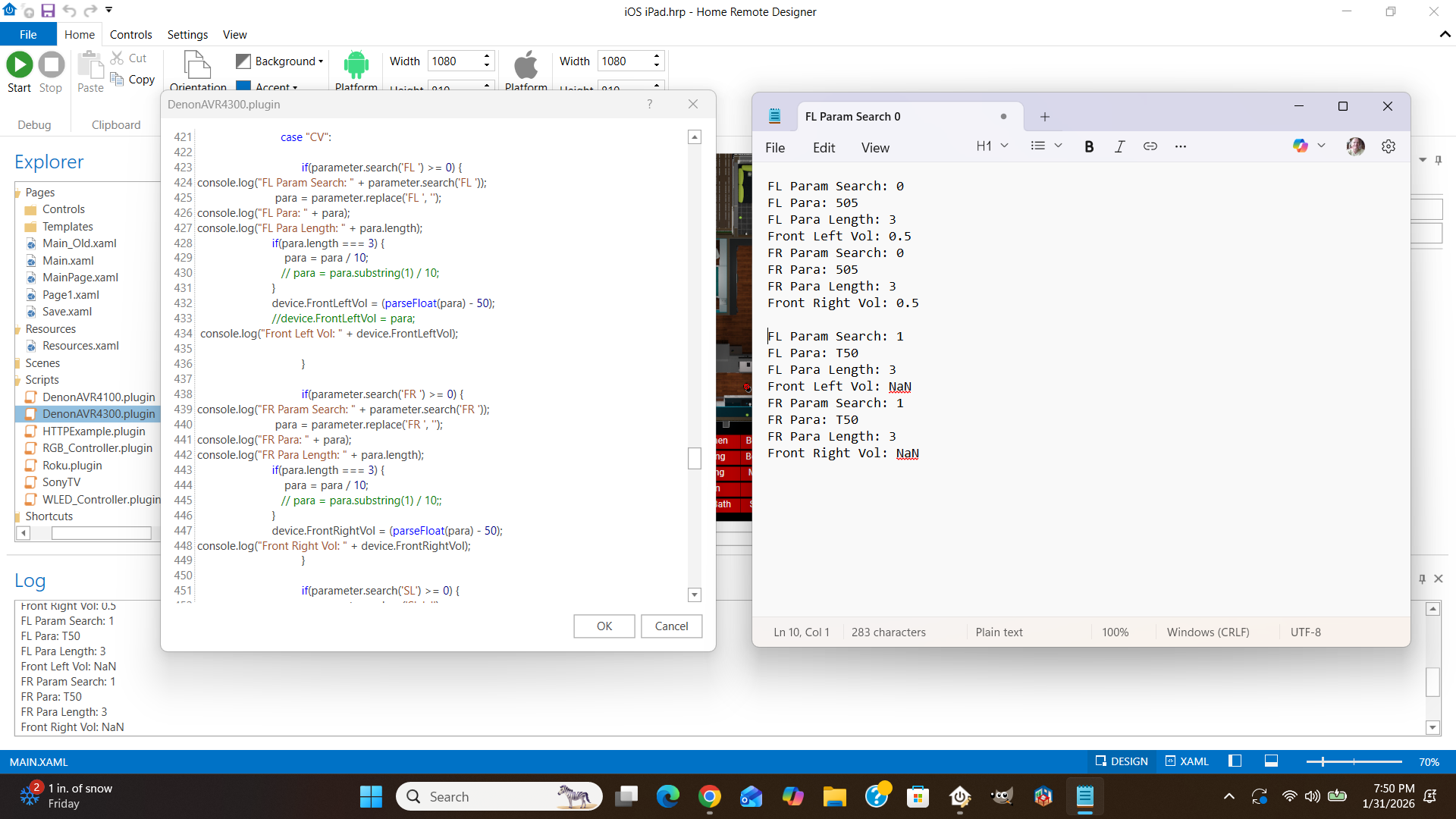
I’m not a programmer. I can say that chatGPT is useful for coding and I’ve had luck copying and pasting into it.
In order to remedy the situation, I changed the code in the onPoll section under the case ‘CV’: section to the following:
if(parameter.search(/^FL /) >= 0) {
para = parameter.replace('FL ', ‘’);
if(para.length === 3) {
para = para / 10;
}
device.FrontLeftVol = (parseFloat(para) - 50);
}
if(parameter.search(/^FR /) >= 0) {
para = parameter.replace('FR ', ‘’);
if(para.length === 3) {
para = para / 10;
}
device.FrontRightVol = (parseFloat(para) - 50);
}